

 Platform
 W&B Models
 W&B Weave
 W&B Inference
 W&B Training
 Release Notes
1. Automatic tracking of LLM library calls
Weave integrates automatically with many common integrations and frameworks, such asopenai, anthropic, cohere, mistral, and LangChain.Import the LLM or framework library, initialize your Weave project, and then Weave automatically traces all of Calls made to the LLM or platform to your project without any additional code changes. For a complete list of supported library integrations, see Integrations overview.
- Python
- TypeScript
2. Tracking of custom functions
Often LLM applications have additional logic (such as pre/post processing, prompts, and more) that you want to track.- Python
- TypeScript
Weave allows you to manually track these Calls using the You can also track methods on classes.
@weave.op decorator. For example:Track class and object methods
You can also track class and object methods. You can track any method in a class by decorating the method withweave.op.
- Python
- TypeScript
Trace parallel (multi-threaded) function calls
By default, parallel Calls all show up in Weave as separate root Calls. To get correct nesting under the same parent Op, use aThreadPoolExecutor.
- Python
- TypeScript
The following code sample demonstrates the use of
ThreadPoolExecutor.
The first function, func, is a simple Op that takes x and returns x+1. The second function, outer, is another Op that accepts a list of inputs.
Inside outer, the use of ThreadPoolExecutor and exc.map(func, inputs) means that each call to func still carries the same parent trace context.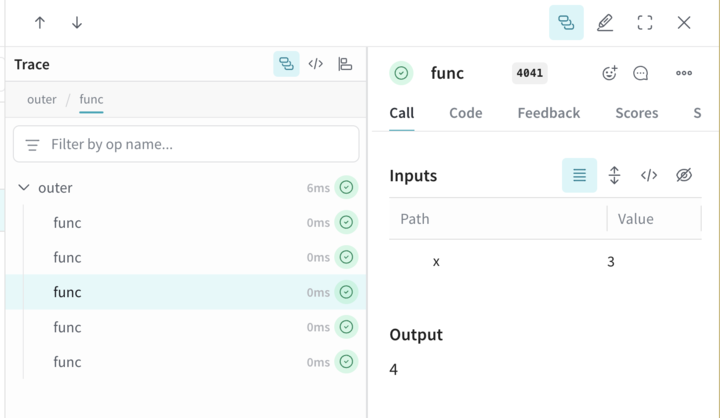
3. Manual Call tracking
You can also manually create Calls using the API directly.- Python
- TypeScript
- HTTP API